


Blossom: Social Investing
4.5158.00 Reviews
App Specs
- Version
- 3.7.8
- Updated On
- License
- Free
- Downloads
- 100,000+
- Developer
- Blossom Social Inc.
- Categories
- Finance
- Platform
- Android
Screenshots




 Analysis by AppCompare
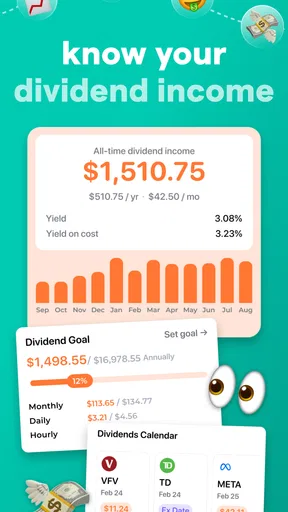
When I choose a portfolio app, I first ask what job I need it to do. Do I want a quick view of investments I already own, a place to learn from other investors, or a tool for placing trades and handling every part of my finances? Those are different needs, and one app rarely handles them all equally well. Blossom: Portfolio Tracker is most compelling when I want to follow stocks, ETFs, dividends, and real investor portfolios in one investing-focused space, rather than treat it as a replacement for my brokerage.
That distinction matters before you move any routine into a new tracker. A brokerage is where you manage transactions; a spreadsheet can offer precise control over calculations and personal notes; a general finance app may bring spending and cash flow into the same view. Blossom sits closer to the portfolio-monitoring and investor-community end of that spectrum. I would judge it by whether those views help me understand my holdings and stay engaged—not by expecting it to do the work of a trading account or a full household budget.
Start with the portfolio questions you actually have
Before installing it, I’d write down the questions I want answered regularly: how my investments are doing, whether dividends deserve more attention, or how other investors structure their portfolios. That small exercise helps avoid turning a tracker into another app I open once, browse enthusiastically, then forget. If I mainly want to see how individual holdings fit into a broader investing habit, Blossom’s focus is a natural match. If I need tax calculations, detailed custom formulas, or spending reports, I’d compare it with tools built around those specific jobs instead.
I would also think about how much of my portfolio I’m comfortable organizing in an app. A tracker becomes more useful when I keep the information I rely on current, but that takes a little ongoing attention. Before making it part of a weekly routine, I’d check how the available portfolio workflow fits my own accounts and habits, then start with a manageable set of holdings. That gives me a chance to see whether the views are genuinely helpful without turning setup into a weekend project.
Where Blossom is a better fit than a bare-bones tracker
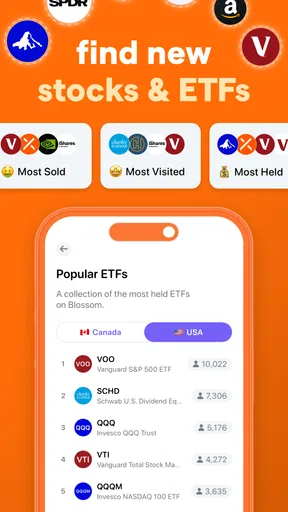
The distinctive appeal is the pairing of portfolio tracking with the ability to follow real investors. Those two activities can complement each other: I can review my own positions, then look at how other people approach investing for perspective. I see the social element as a source of ideas and questions, not a shortcut to a decision. Someone else’s portfolio reflects their circumstances, risk tolerance, and goals, which may be very different from mine.
That makes Blossom especially relevant to a learner who already invests or is preparing to build a more consistent research habit. A plain spreadsheet can be excellent for someone who wants complete control, but it won’t naturally provide a social investing context. Conversely, a feed devoted to investor activity can be engaging but may distract me from my own plan. The useful middle ground is to use portfolio views for personal review and the community side as a prompt to investigate—not as a list of trades to copy.
A practical way to use that social context is to turn each interesting portfolio or investing idea into a question. Why might a holding be there? What role could it serve? Is the idea relevant to my time horizon? I would then do my own research before acting, and I’d be willing to pass on an idea that doesn’t fit. That approach keeps the app’s community aspect educational rather than letting popularity stand in for suitability.
Worth Reading Before You Choose

EA SPORTS FC Mobile 26 Is a Bigger Football Game, but It Takes Time

Flipboard Shows What News Apps Must Do Beyond the Feed

Switching to Android Auto Means Rethinking Your Driving Routine

Google Calendar Makes a Crowded Week Easier to Manage

Ludo King Makes the Most of the Minutes Between Plans

Baby Panda World Brings Quick Play to Modern Phones, but Its Game Library Feels Busy
A routine that keeps the app useful
Imagine I have a few minutes after payday to check my investments. Instead of refreshing prices throughout the day, I could open my tracker, review the holdings that matter, note any dividend-related details I want to revisit, and save one or two questions for later research. The point is not to react to every market move. It is to create a calm, repeatable check-in that helps me stay aware without allowing a portfolio screen to set my mood.
I’d keep that review focused. First, look at the portfolio as a whole rather than letting one eye-catching holding dominate the session. Then check the positions or dividend information connected to the goal I’m currently working on. Finally, record what needs further research outside the moment. This simple sequence can make an investing app more useful while reducing the temptation to treat every update as a reason to buy or sell.
For a new investor, a second helpful habit is to write down why a holding interests them before following someone else’s example. Later, they can compare that original reasoning with what they learned from the community. This makes the app part of a learning process instead of a source of unexamined recommendations. It also helps separate a portfolio that is interesting to browse from one that actually suits the user.
Where another kind of tool may work better
Blossom may not be the right home base for someone who wants to execute trades, manage bills, track a complete household budget, or build a highly customized financial model. In those cases, a brokerage, budgeting app, or spreadsheet may be a better primary tool. I would not switch away from a tool that already answers my important questions just because another interface looks more inviting; I’d first identify what is missing and test whether Blossom fills that gap.
It may also be a poor fit for someone who finds investing feeds stressful or tends to make impulsive decisions after seeing other people’s activity. A community can broaden what I notice, but it can also invite comparison. If I know that checking other portfolios makes me second-guess a sound plan, I’d keep my use centered on my own tracking or choose a quieter, less social alternative. The best tracker is the one that supports a healthy process, not the one with the most tempting screen to revisit.
There is a trade-off between convenience and control, too. A dedicated tracker can make portfolio information easier to revisit, while a spreadsheet may be more flexible for someone who wants to define every category and calculation themselves. Neither approach is universally superior. I’d choose based on whether I value a ready-made investing environment or the ability to shape a personal record exactly as I like it.
Before changing your investing routine
Switching trackers can involve more than installing an app. I’d check what I currently rely on—saved notes, spreadsheet formulas, recurring review reminders, and any portfolio details I use to make decisions—before changing my routine. Then I’d try Blossom alongside that existing system for a short period, using the same small set of holdings and questions. If it makes those check-ins clearer, I can gradually rely on it more; if I keep returning to my old method for essential details, that is a useful sign that the fit is incomplete.
I would not assume that trying a new tracker means I need to abandon the tools connected to my investments. Keeping the brokerage as the place for account actions and using a tracker for reflection can be a sensible division of labor. For anyone concerned about linking accounts or sharing financial information, it’s worth reviewing the app’s current setup and privacy details directly before connecting anything. I would only provide access I’m comfortable granting, and I’d avoid treating convenience as a reason to skip that decision.
Blossom is a free finance app from Blossom Social Inc., with optional in-app purchases. It is rated for teens, has an average rating of 4.6 from around 3,600 ratings, and has been installed over 100,000 times. Those figures can help set expectations about its audience and reach, but they don’t tell me whether its approach will suit a particular investor. I’d make that decision by trying the portfolio workflow and deciding whether the social angle adds useful context or unwanted noise.
If you already have a reliable way to track your investments, the main question is whether Blossom gives you a reason to check in more thoughtfully. If you are starting from scratch, I’d begin with a modest routine and avoid making a social portfolio the basis of an investment plan. I’d also review any optional purchase choices before spending, especially if the free experience already covers what I need. That keeps the decision practical rather than driven by curiosity alone.
There are a few details I’d settle before making it a long-term part of my setup: whether its available tracking workflow suits the accounts I use, whether the dividend and portfolio views answer my usual questions, and whether following other investors improves my research habits. Those are more useful tests than simply asking whether an app has many features. I’d give it a fair trial with real questions from my own investing routine, then keep it only if the answers are easier to find.
My recommendation is strongest for people who want an investing-centered place to keep an eye on stocks, ETFs, and dividends while also exploring how real investors approach portfolios. I’d suggest a different primary tool to anyone who needs detailed budgeting, extensive custom analysis, or a transaction-focused brokerage experience. For someone in between, Blossom is worth considering as a companion rather than an all-in-one financial command center.
On Android, the app requires version 6.0 or later, and its current version is 3.4.4. I’d check that my device meets the requirement and confirm the app’s current options before building a routine around it. The most important question remains personal: does it make me more informed and deliberate, or just more likely to check my investments? If it supports the first without encouraging the second, it has a clear place in my toolkit.
Getting Started with Blossom
First things first, downloading Blossom is a breeze. Available on both Android and iOS, it’s just a matter of heading to the app store, hitting download, and you’re good to go. The installation process is smooth, and before you know it, you’re ready to explore all the features this app has to offer.
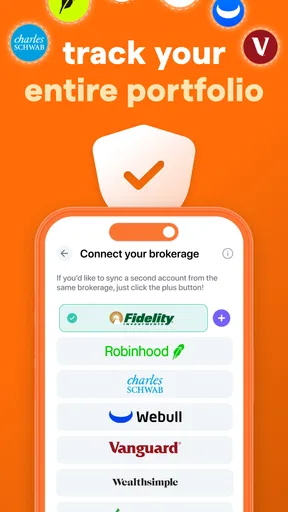
Once you’ve got the app installed, you’re greeted with a clean and intuitive interface. I love how everything is laid out in a way that’s easy to understand, even if you’re not a finance guru. The setup process involves linking your investment accounts, and Blossom really shines here with its secure integration. No need to worry about your data being mishandled—security is clearly a top priority.
Features That Stand Out
Now, let’s chat about some of the features that make Blossom worth your time. One of my personal favorites is the real-time tracking. Whether you’re keeping an eye on stocks, ETFs, or crypto, Blossom provides updates that are as fresh as your morning coffee. This feature keeps you in the loop, allowing you to make informed decisions on the fly.
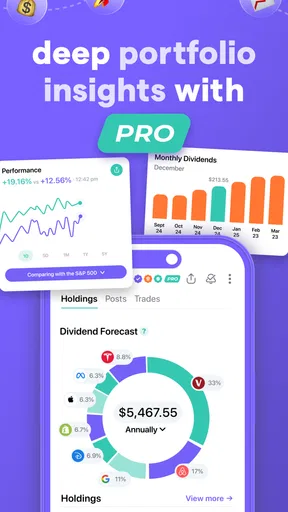
Another standout is the performance analysis. Gone are the days of scratching your head over complex data. Blossom breaks everything down into easy-to-digest visuals. You can see your portfolio’s performance over time, which is super handy for identifying trends and making strategic moves. Plus, the app’s ability to generate detailed reports is perfect for those of us who love to dive deep into the numbers.
User Experience and Interface
Let’s talk about the user experience because, honestly, it’s on point. Blossom’s interface is sleek and modern, with a focus on user-friendliness. Navigating through the app feels intuitive, and the design is visually appealing. The developers clearly put a lot of thought into making the app not just functional but also enjoyable to use.
The customization options are another big win. You can tailor the dashboard to fit your preferences, which means you’re always seeing the information that matters most to you. Whether you’re a numbers nerd or prefer a more visual layout, Blossom has you covered.
Support and Community
In terms of support, Blossom doesn’t disappoint. They offer a robust help section within the app, complete with FAQs and troubleshooting guides. And if you ever find yourself stuck, their customer support team is just an email away. From my experience, they’re prompt and genuinely seem to care about resolving any issues you might encounter.
What’s more, Blossom boasts a thriving community of users. It’s always nice to know you’re not alone in your investing journey, and the community aspect adds a layer of depth to the app. Whether you’re looking for advice or just want to share your latest win, the Blossom community is a great place to connect with like-minded individuals.
Final Thoughts
So, there you have it—my take on Blossom. It’s an app that offers a comprehensive suite of tools for managing your investments, all wrapped up in a user-friendly package. Whether you’re just starting out or have a well-established portfolio, Blossom provides the features and support you need to succeed.
In the ever-evolving world of finance, having a reliable tool like Blossom at your fingertips is invaluable. It’s not just about tracking your investments; it’s about empowering you to make smarter financial decisions. So, why not give it a try? You might just find it’s the perfect companion for your investment journey.
Pros
- User-friendly interface for easy navigation.
- Real-time updates on portfolio performance.
- Customizable alerts for price changes.
- Supports multiple asset types and platforms.
- Comprehensive analytics tools included.
Cons
- Limited free version features.
- Occasional sync delays with exchanges.
- High learning curve for beginners.
- No offline mode available.
- Premium features can be costly.
FAQs for Blossom: Social Investing
What is Blossom: Portfolio Tracker used for?
Blossom: Portfolio Tracker is a comprehensive app designed for managing and tracking your investment portfolio. It provides detailed analytics, real-time updates, and insights into your assets' performance, making it ideal for both novice and experienced investors. Users can monitor stocks, cryptocurrencies, and other financial instruments in one centralized platform.
Is Blossom: Portfolio Tracker free to use?
Blossom offers a free version with basic features, allowing users to track and manage their portfolios. However, there is a premium subscription available that unlocks advanced features such as detailed analytics, personalized alerts, and additional support. This paid version is ideal for users looking to maximize their investment tracking capabilities.
Can I sync Blossom: Portfolio Tracker across multiple devices?
Yes, Blossom: Portfolio Tracker offers seamless synchronization across multiple devices. By creating an account, users can access their portfolios from any device, ensuring consistent updates and management. This feature is particularly useful for users who need to monitor their investments on the go, whether using a smartphone or tablet.
What security measures does Blossom: Portfolio Tracker have in place?
Blossom: Portfolio Tracker prioritizes user security by implementing robust encryption technologies to protect sensitive data. The app also offers two-factor authentication for an added layer of security. With these measures, users can confidently manage their investments, knowing that their personal and financial information is safeguarded.
Does Blossom: Portfolio Tracker support cryptocurrency tracking?
Yes, Blossom: Portfolio Tracker supports cryptocurrency tracking alongside traditional investments. Users can add and monitor various cryptocurrencies, keeping track of price changes and overall performance. This feature makes Blossom a versatile tool for investors looking to diversify their portfolios with both traditional and digital assets.


